
Showing posts with label reflective learning. Show all posts
Showing posts with label reflective learning. Show all posts
Saturday, 2 February 2013

Friday, 1 February 2013

Wednesday, 23 January 2013

Tuesday, 22 January 2013
Saturday, 19 January 2013

Friday, 18 January 2013

Thursday, 17 January 2013
Reflective Learning Part 2
Hurrah! My zombie is safely in that last post. I was going to edit that post to add a couple of points but having opened it I decided it would be easier to create a new post - I think the Blogger functionality may work better on a computer then the much loved iPad I'm currently using and I don't want to risk losing my zombie.
I think I could have uploaded my picture from web Blogger (rather than the app) if I had created a Google + account but at the moment I don't want to because it shares too much information for my liking. Anyway, I like the sense of satisfaction you get when you create a successful workaround so that made the laborious process worthwhile.
So what have I learnt from this? Am I reflecting? Shall I share my reflections? Well, it reinforced my thinking that Googling is a great way to find the answer to any technical question - that is how I found the free Blogger app. I also learnt (by playing around with the screen) how to save a picture from Facebook to the iPad photo gallery which will be useful in the future; initially I thought I'd have to take a screenshot of it which would not have looked so good. But* mostly it confirmed my thinking that I like playing with comic apps!
*I know, sentences should not start with but or and. But I've done it. And I'm using the informality of blogging as my excuse to carry on doing it.
(Now switching to the app to add an image...)

I think I could have uploaded my picture from web Blogger (rather than the app) if I had created a Google + account but at the moment I don't want to because it shares too much information for my liking. Anyway, I like the sense of satisfaction you get when you create a successful workaround so that made the laborious process worthwhile.
So what have I learnt from this? Am I reflecting? Shall I share my reflections? Well, it reinforced my thinking that Googling is a great way to find the answer to any technical question - that is how I found the free Blogger app. I also learnt (by playing around with the screen) how to save a picture from Facebook to the iPad photo gallery which will be useful in the future; initially I thought I'd have to take a screenshot of it which would not have looked so good. But* mostly it confirmed my thinking that I like playing with comic apps!
*I know, sentences should not start with but or and. But I've done it. And I'm using the informality of blogging as my excuse to carry on doing it.
(Now switching to the app to add an image...)
Reflective Learning
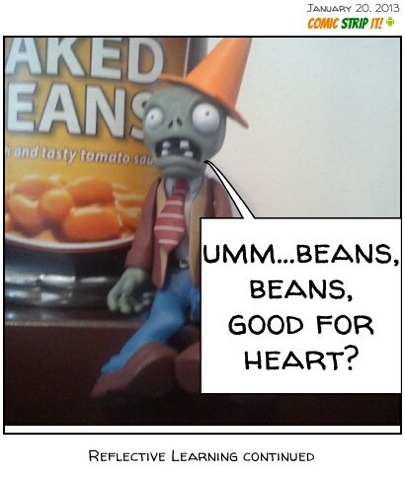
Hopefully somewhere on this post there is a picture of a zombie who has been reflecting on his learning. However, getting the picture on the blog was not as straightforward as I anticipated because I was determined to do it without using a computer.
Stage 1: create a photo, add a caption and speech bubble.
Rating: easy.
I downloaded a free app onto my Android phone called ComicStripIt. Using this app I took a photo of my slightly puzzled looking zombie, added a caption at the bottom, added a speech bubble and moved it around until I was happy with it then saved it and shared it on Facebook.
Stage 2: upload my captioned zombie picture onto this blog.
Rating: not so easy!
I switched from using my phone to the iPad and opened up Facebook so I could retrieve my picture. I don't use the Facebook app on the iPad (I prefer the web version) so I logged on using the Safari browser, found my photo (complete with a couple of comments from my friends) and saved it to the iPad photo gallery. So far so good.
I then opened up Blogger, created a new post and tried to add a photo. However, there was no option to add a photo from the gallery. Never mind, thought I, as I returned to using my phone, I'll do it this way and sure enough from the web version of Blogger I had the option to added a photo from the phone gallery. However, there was no option to save the picture from the ComicStripIt app to the phone photo gallery. Hmm. So I used What's App to send the picture from the comic app to a friend, then tried to save it from within What's App to the photo gallery. No joy.
So I am now back on the iPad having downloaded the free (and very basic) Blogger app and I think it has added the picture from the iPad gallery but I can't see where on the page it ill be. So I will now publish this post then switch back to the web version to see how it looks!

Stage 1: create a photo, add a caption and speech bubble.
Rating: easy.
I downloaded a free app onto my Android phone called ComicStripIt. Using this app I took a photo of my slightly puzzled looking zombie, added a caption at the bottom, added a speech bubble and moved it around until I was happy with it then saved it and shared it on Facebook.
Stage 2: upload my captioned zombie picture onto this blog.
Rating: not so easy!
I switched from using my phone to the iPad and opened up Facebook so I could retrieve my picture. I don't use the Facebook app on the iPad (I prefer the web version) so I logged on using the Safari browser, found my photo (complete with a couple of comments from my friends) and saved it to the iPad photo gallery. So far so good.
I then opened up Blogger, created a new post and tried to add a photo. However, there was no option to add a photo from the gallery. Never mind, thought I, as I returned to using my phone, I'll do it this way and sure enough from the web version of Blogger I had the option to added a photo from the phone gallery. However, there was no option to save the picture from the ComicStripIt app to the phone photo gallery. Hmm. So I used What's App to send the picture from the comic app to a friend, then tried to save it from within What's App to the photo gallery. No joy.
So I am now back on the iPad having downloaded the free (and very basic) Blogger app and I think it has added the picture from the iPad gallery but I can't see where on the page it ill be. So I will now publish this post then switch back to the web version to see how it looks!
Subscribe to:
Posts (Atom)